How to Create a Miniature Espresso Scene Using Google Gemini
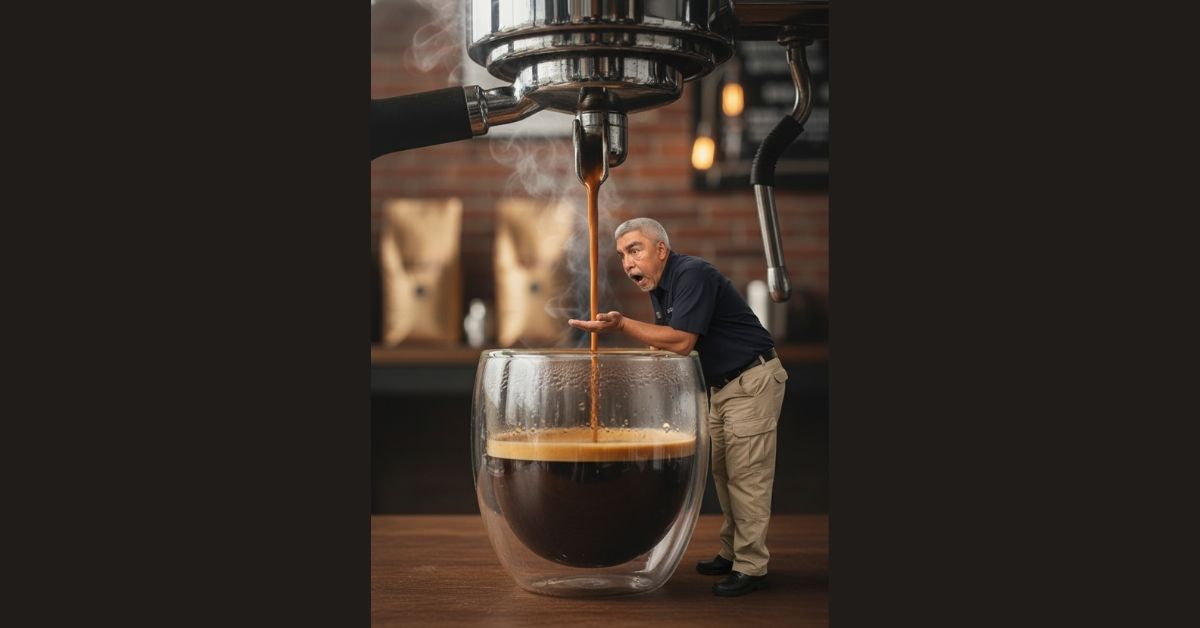
AI image creation lets artists tell bold visual stories with simple tools. This guide shows how to create a Miniature Espresso Scene using Google Gemini. The prompt focuses on surreal scale, rich coffee detail, and cinematic lighting. It blends hyper-realistic AI art with a playful concept that feels real and tactile. If you enjoy surreal scale photographyand coffee visuals, this workflow fits your style.
The scene places a tiny human beside a giant espresso machine. Espresso flows like a waterfall. Steam fills the air. Chrome shines under warm light. This contrast gives strong visual impact and clear storytelling. The prompt works well for creators who explore AI-generated photorealism and cinematic themes.

Miniature Espresso Scene Step-by-Step Guide
Step 1: Copy the Prompt for Miniature Espresso Scene using Google Gemini.
Start by copying the full text of your prompt. You will use it later inside Gemini. The prompt helps Gemini create a Miniature Espresso Scene.
Copy this full prompt:
A hyper-realistic 8K cinematic photo showing a surreal scale contrast. A miniature person, accurately matching the uploaded face reference, with a prominent beard, wearing a dark short-sleeved shirt and tactical cargo pants, stands beneath a giant industrial espresso machine. The tiny figure leans forward and looks up, cupping one hand to catch a thick stream of dark amber espresso with rich crema flowing from a chrome portafilter.
In the foreground, an oversized clear double-walled glass filled with espresso dominates the frame, emphasizing the size difference with realistic liquid depth and condensation.
Captured from a low-angle close-up, 35mm lens, shallow depth of field, with sharp focus on the espresso stream and figure. Warm cinematic lighting, realistic reflections on chrome, detailed fabric textures, and soft volumetric steam rising around the portafilter. Background is a warm, diffused industrial café setting, softly blurred for depth. Photorealistic, ultra-detailed, natural color grading.
Or you can just click on the COPY button below:
Step 2: Open Google Gemini
Open Google Gemini in your browser. Make sure image generation is available.
Step 3: Upload Your Photo
Upload a clear headshot. Use good light and a neutral face. This step helps facial likeness preservation.
Step 4: Paste the Prompt
Paste the enhanced prompt into Gemini. The clear structure helps AI image generation follow each rule.
Step 5: Wait for Gemini to Generate the Image
Wait for Gemini to create the collage. Review the digital caricature art for pose, emotion, and balance.
Gemini processes details like espresso crema close-up, chrome portafilter detail, and volumetric steam effect. The result often shows strong depth and mood. The low-angle cinematic shot helps sell the scale difference. The industrial café aesthetic adds context without clutter.
Miniature Espresso Scene Closing Thoughts
This Miniature Espresso Scene prompt shows how clear language shapes strong visuals. It blends cinematic coffee imagery with a playful concept. The scene feels real due to focus on materials, light, and scale. Use this prompt as a base for other ideas like food giants, tiny workers, or café stories. With clean structure and strong detail, your AI image generation prompt can stand out and engage viewers who love surreal coffee art.
AI Image Generation | Google Gemini Creations